TREVONE
I was introduced to my first programming language at age nine: Logo. This was part of the two-decades-long effort by my father to make me a computer scientist.
Logo is a programming language where you control a virtual pen (called the “turtle”) on the screen and draw things. Logo was built for children to get familiar with programming. It’s kind of like Microsoft Paint, but you write code to control the cursor.
Apps to write and run Logo are almost always structured like a Read-Execute-Print-Loop (REPL), which is jargon describing how after each command you write for the computer, you see the outcome before writing the next line, et cetera.
If you’d like to give it a try, download Logo here.
But I never got hold of a language reference manual as a child. The only language features I knew were: forward, backward, right, left, repeat, penup and pendown. You can make some polygons, circles and stars with these keywords, but not too much more.
I knew many things were possible from the inspiring demo that ships with this implementation of Logo but I didn’t know what the keywords to use them were.
Yesterday on a train from London to Cornwall I downloaded Logo again after 15 years and gave it another go. At age nine, I wouldn’t even have known to ask for a language reference manual. At 25, I know how to find and read one, and what to expect it to contain.
I wanted to play around with loops and randomness. First take a look at this simple program to draw a circle. It repeats 360 times, moving forward one dot, and then rotating 1 degree clockwise.

I modified the program to rotate a random number of degrees between each forward move, and to repeat for longer than 360.
This is cool, it makes some sort of loopy doodles that look hand drawn. It made me wonder – can I draw a circle that looks hand drawn?
The first attempt would be to just repeat this loop 360 times to complete a circle, and to ensure that if we are moving forward by one dot, then the rotated angle is 1 degree in expectation, even if it is drawn at random.
Here’s what that looks like (I made it draw five so you can see the variety).
for [x 0 600 135] [pu setpos [-400 0] setheading 0 rt 90 fd :x pd lt 90 repeat 360 [fd 1 rt (random 21)/10]] hideturtle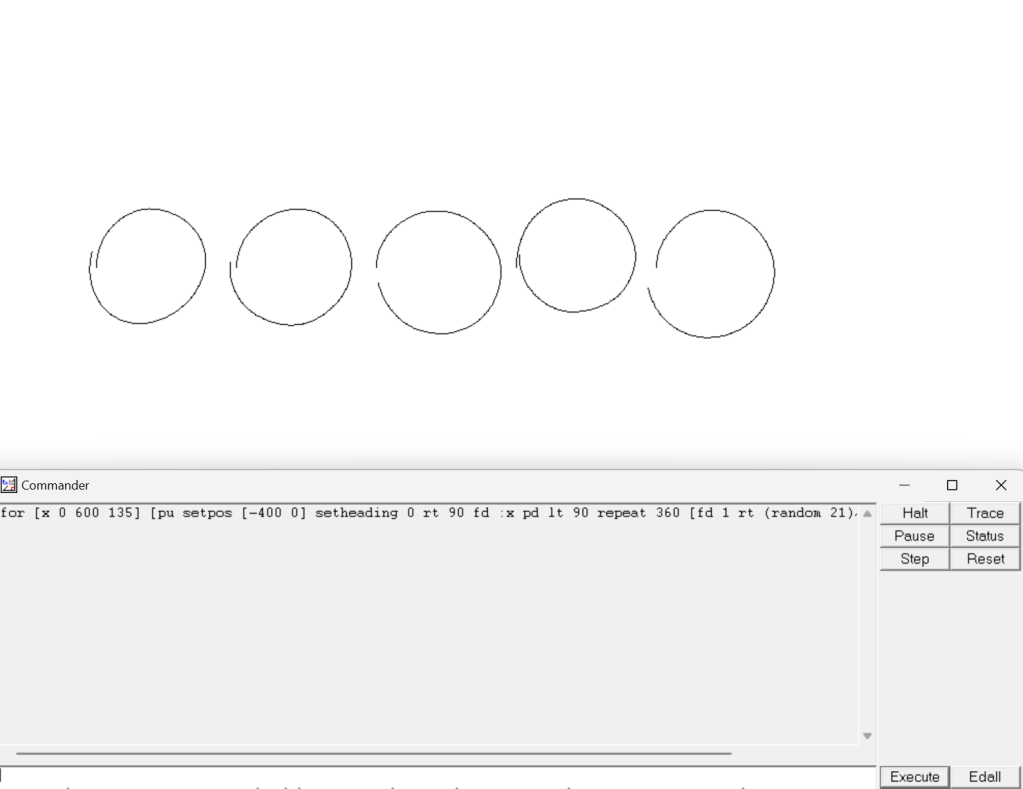
These are alright, and definitely look like hand drawn circles. But whenever I hand draw my circles, I always make sure the ends meet. I wanted to incorporate that into my circles as well.
I thought about how I might do that, maybe I could track the total angle I have rotated so far, and ensure that not only is the average angle rotated 360 degrees, but make sure that I rotate exactly 360 degrees each time. But some experiments with that showed me that that’s not how the mathematics of this works. The order in which we do forwards and rotates matters, and one doesn’t get a circle just by ensuring a total of 360 forwards and 360 angles rotated in some random order.
I thought about it for a while longer just before bed and figured it out. It took two tricks:
- The turtle starts at a position [0 0]. Throughout the drawing of a perfect circle, it’s x position increases to positive values and then returns to 0, but it never becomes negative. In the above incomplete circles, you can see circles 1, 2 and 5 having this issue of finishing further left than they started. I coded up the logic to ensure that if the turtle crosses into negative x values it should immediately rotate itself to point vertically and complete the circle. This is reminiscent of hand drawn circles that have a short straight edge near to where the two ends are made to meet
- The other problem was when the turtle didn’t return to [0 0] because it stopped too far to the right. This is the problem in incomplete circle 4 above. For this I added a hacky solution that after rotating 340 degrees, the turtle just goes straight, after which at some point it will cross into negative x values and fall into the logic of trick 1.
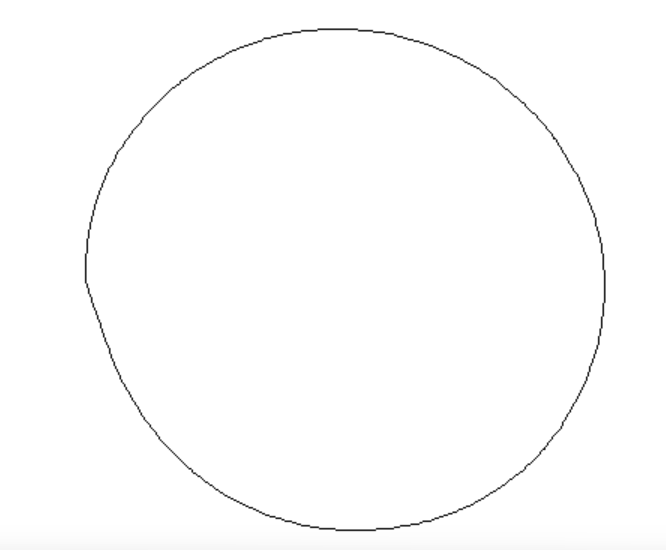
setpos [0 0] repeat 364 [ifelse (and (heading > 340) ((first pos) > 0)) [fd 2 + random 3] [ifelse ((first pos) < 0) [setheading 0 fd 2 + random 3] [fd 2 + random 3 rt 1]]] while [((last pos) < 0)] [fd 1]This was hacky but it worked well. Here is a random circle completed only with the logic of trick 1

And here is one completed primarily with trick 2.
This was really fun to do. I’ve had the weight of the world on my shoulders as a privileged computer science student. There’s an infinity of potential projects to build and companies to start. You always feel like you should be doing more, that you could have done so much more by now.
It’s nice to reconnect with the simpler time of drawing shapes on a screen. When programming was just for fun, not political nor profitable.
I hope to continue this momentum and code for pleasure more often.
 Shashvat Shukla